BYOD Begins With Trust and Respect

I have written extensively over the past couple of years about our Bring Your Own Device (BYOD) initiative at New Milford High School at the Huffington Post and on my own blog.  It has been interesting to look back at all my blog posts to see how far we have come with BYOD at NMHS.  My first ever post on the topic just provided a small glimpse at the possibilities inherent when students are empowered to use the technology that they already posses to enhance their learning experience.


Image credit: http://www.securedgenetworks.com/secure-edge-networks-blog/bid/81148/4-Myths-of-BYOD-on-Enterprise-Wireless-Networks-Debunked

It was our desire and quest to create a school culture and learning environments that were more reminiscent of the real world that our learners would soon be a part of that drove change in this area. When I reflect upon how the program has evolved into its current state I cannot help but to think about the most important change that was made recently.  It was during the summer that Ron Watson, the NM District IT Director, and I met to discuss the future of BYOD at NMHS. Up until this point we had students sign off on a paper guideline sheet after which I created a username and password for them to access the secure guest network.  This information was then passed on to Ron and each student that filled out the form was granted access.  There is no doubt in my mind that this process limited the amount of students who opted to bring their own mobile learning devices to school. I cant thank Ron enough for putting students first! Speaking of Ron, he just informed me that we had 460 unique devices connect to our guest Internet network yesterday (535 for the week) at my school. This is fairly significant as we only have 650 students and 53 staff members.  Take a look at the traffic at each access point below.
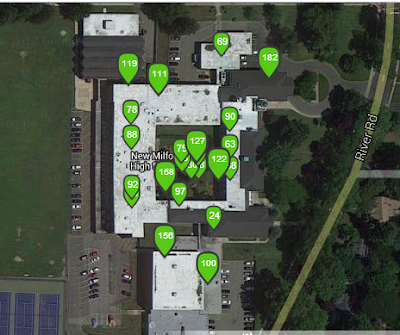


After critically analyzing our process and the culture of NMHS it was decided to change how we went about allowing students to access the Internet.  We decided to trash the old process reliant on paper and emails by replacing it with a seamless alternative that empowered students to want to bring their mobile devices to school.  This week I revealed these changes to our students.  While encouraging them to bring in their tools I explained that they could now access the Internet immediately with their current passwords and usernames that they have used to log onto school computers during their entire NMHS careers.  All they had to do now was bring in their device, select the guest network, enter their username/password, and check the box to agree to the terms of use. Then wallah, they would be connected to the Internet. Below is the terms that each student now has to agree to in order to access the Internet:


NMHS students and parents/guardians fully acknowledge that use of a personal device on the premises of New Milford High School is subject to all guidelines, rules and regulations governing acceptable use as established by the New Milford Public Schools Board of Education, Policy #2361 and Regulation R2361.  It is further understood that use of a personal device is restricted to those activities as required or related to the students program of study and any use otherwise may be subject to disciplinary action including loss of device use privileges. Students WILL NOT access websites with inappropriate content using a 3G or 4G connection. Students and parents understand/agree that New Milford High School is NOT responsible for any damage or theft that may occur to the laptop while on school property. 
By logging into the New Milford wireless network, they are accepting the terms of the New Milford Student Responsible Use Guidelines. Once on the New Milford wireless network all users will have filtered Internet access just as they would on a district-owned device. 

Our BYOD initiative at NMHS has succeeded and grown up to this point based on the basic premise of trust and respect.  Yes, we have policies in place, the right infrastructure, and support our teachers with professional development and guidance. However, the most important elements stem from the fact that we trust our students to use their devices as tools for learning, enhanced productivity, and to conduct better research.  Time is spent working with them on digital citizenship and the creation of positive digital footprints that they can be proud of.  We also respect them as learners growing up in the digital age where these tools are playing a greater role in the world we are preparing them to succeed in.  When creating a BYOD initiative grounded in these principles the possibilities are endless.

What do you think are the keys to a successful BYOD initiative?
Read More..

Apps and Social Media in the Classroom


It is springtime at New Milford High School and new ideas are flourishing.  Teachers are consistently empowered and given the autonomy to take calculated risks without the fear of failure to enhance the teaching and learning process.  The end result is that our students benefit from lessons that combine sound pedagogy with the effective integration of technology. Below are two highlights from the month of April.


In support of the school’s BYOD initiative, Mrs. Chellani has recently discovered and integrated a new app called Socrative, a free, online polling tool.  This app allows students to respond to questions the teacher asks in class via their smart phone, providing an alternate means for students to participate in class.  The results are displayed on the SMART Board through the Socrative website to facilitate discussion.  Additionally, this app serves as another way for Mrs. Chellani to formally assess her students in a differentiated and technologically advanced fashion. 

Students in Mr. Devereauxs AP Biology class are creating social media accounts for the immune system.  Using Facebook, Twitter, Pinterest, or Tumblr, the students need to narrate a day in the life of the immune system.  They have been finding creating ways of using hash tags, mentions, pictures, videos, and various other ways to infuse their projects with relevant, accurate, and interactive content illustrating how the immune system works.  Check out Mr. Devereauxs website by the end of the week to see some student examples.


Read More..

How to view all your highlights in one place

How to view your Kindle highlights on the web Kindle tip: How to view all your highlights in one placeWhether you read Kindle books on a smartphone, a tablet, in a web browser, or on an honest-to-goodness Kindle,

There’s also no easy way to copy and paste highlighted passages, not even using Kindle “Cloud” reader on the web.
That said, there is another, little-known way to view your Kindle highlights: using your online, web-based Kindle profile.
Once you activate your profile, you can click a link to quickly scan your highlights across all your Kindle books, all at once.
And yes, you can even copy and paste highlighted passages—within reason, hopefully.
Last but not least, you can also share your Kindle highlights and notes with other Kindle-toting bookworms … but only if you want to, of course.
Your Highlights on Kindle profile 300x229 Kindle tip: How to view all your highlights in one place
You can view all your highlights for every Kindle book you own from your online Kindle profile.
Here’s how…
  • First, visit kindle.amazon.com in your desktop web browser and activate your profile—a process that involves little more than signing in with your Amazon account.
  • Once that’s done, you can customize your profile with your name, city, and other details, or connect your Kindle profile with Facebook or Twitter. You can also just leave your profile blank, if you’d rather.
  • Next, click the “Your Highlights” link at the top of the page, and you’ll see a list of any passages you’ve highlighted in any Kindle book, ever. Any additional highlights (and “notes,” for that matter) will appear in this list once you’ve synced your Kindle device and/or app.
  • Want to copy and paste a highlight? Just select it, copy it to your system’s virtual clipboard (Command + C on a Mac, or Control + C on a PC), then paste it into a Word or text document (Command + V for Mac, Command + V for PC), just as you normally would.
  • To nix a highlight remotely, just click the nearby “Delete this highlight” link.
  • Finally, you can share a highlight with other Kindle users. Click the “Your Books” link at the top of the page, click on a book with highlights you want to share, then click the “Make Public” button in the top-right corner of the page. And in case you’re wondering, your existing highlights will remain private until you say otherwise.
How to view all your highlights in one place
Read More..

Unlock With WiFi v2 0 android apk apps

Unlock With WiFi v2.0 for Android version 2.1 and higher
Unlock With WiFi v2.0"

Unlock With WiFi unlocks your phone when youre connected to your home WiFi network. What does "unlock" mean? It means you dont have to enter your password/pattern/PIN when you turn on your phone. When youre at home, or work, you dont need to worry about losing your phone, so why should you have to enter your password?

How does it work?

When you get home and connect to your WiFi network, your device will unlock. Then when you leave, and the WiFi disconnects, the device will lock again. You have to enter your password the first time after you connect to your WiFi network. This is so that if someone steals or finds your phone, they cant just bring it to your house to unlock it. After you enter your password once while connected to your WiFi network, you wont have to enter it again until you leave/disconnect. This is great for SMS texting!

What else does it do?

You can also set a lock delay, for when youre not at home. The default delay is set to 5 seconds (you can adjust it), so when you turn the screen off, the device wont lock until 5 seconds have passed. That way, if you remember something you forgot to do, you can turn it back on without entering your password. This feature is considered experimental at this time. It works on most devices, but isnt guaranteed to work on all devices.

There are also battery saving options to:

Turn off WiFi when you leave home
Turn on GPS when you leave home*
Turn off GPS when you get home*
Turn on Bluetooth when you leave home
Turn off Bluetooth when you get home
Turn off Auto Sync when you leave home
Turn on Auto Sync when you get home

* This feature is experimental, and not guaranteed to work on all devices.

Works on tablets too!

IMPORTANT: If you have trouble with this app, please email me (unlockwithwifi@benhirashima.com) and I will respond right away. Dont give me a bad review until I have a chance to help you get it working!

Known Limitations:

WARNING: This app doesnt work on some phones. Please read this description carefully, and the FAQ.

This app wont work if your employer enforces a password policy on your phone. Many corporate Exchange email users have this.

Unlock With WiFi is incompatible with Juice Defender, Green Power, BatteryFu and other apps. See the FAQ.

Make sure to exclude Unlock With WiFi from your task killer apps, or it wont work properly.

Unlock With WiFi doesnt work on the Samsung Fascinate if its been upgraded to Android 2.2 (stock Samsung ROM). It also doesnt work at all on the Samsung Charge.

See the FAQ for more details "http://benhirashima.com/unlockwithwifi/faq"

Tech support is only available in English.

License Agreement

By downloading this software, you are agreeing to the End User License Agreement, which can be read here: "http://benhirashima.com/unlockwithwifi/eula". Its pretty standard stuff.

Keywords: security, automation, utility, tool

Recent changes:
The biggest addition in 2.0 is Device Admin mode. It uses an alternative method of unlocking the device. This method preserves the slide-to-unlock screen when the phone is unlocked. Device Admin mode also makes it less likely that the screen will turn on when lock delay is enabled.
There are also options to toggle Bluetooth and Auto Sync when you leave/return home.
If you encounter bugs, please email me. Ill fix them ASAP.
Full list of changes: "http://benhirashima.com/unlockwithwifi/change-log"

More Info:
http://www.appbrain.com/app/unlock-with-wifi/com.benhirashima.unlockwithwifi


Download :
Unlock With WiFi v2.0

Mirror:
http://www.wupload.com/file/89142630
http://www.multiupload.com/RDL8WK6209
Read More..

Critical Literacy Across the Curriculum

How can an English teacher help to develop critical literacy across the curriculum? What follows is a guest post from NMHS teachers who have been collaborating with English teacher Joanna Westbrook to create authentic literacy tasks in each of their disciplines.  You will hear from a science teacher, a social studies teacher, and an art teacher as each provides her take on how the Common Core and 21st Century learning goals affect what goes on in the classroom. 

Image credit: http://allthingslearning.wordpress.com/tag/critical-literacy/

A Biology Teacher’s Thoughts on Critical Literacy by Lynne Torpie

Science teachers can tend to be myopic, focusing on acquiring content detail and teaching the steps of the scientific method instead of fostering the investigative, critical thinking and written communication skills that embody real-world scientific endeavors.  As science teachers for the 21st century, we are tasked with producing, at the bare minimum, citizens who are conversant with the language of science, and who can read, make sense of and make decisions about scientific issues.  Optimally, we inspire our students to pursue a career in which they will be posing relevant questions, and using research and inquiry to answer those questions to contribute to humanity’s general body of knowledge or, through technology and engineering, solve problems. Literacy skills are the foundation upon which these outcomes are built.

But we as science teachers can be daunted by the mandate to incorporate English language skills into the curriculum.  We have neither the training to assess such skills nor the language to develop such assessments.  We are concerned about our students’ weak explanatory writing skills and would like to see those skills improve. But we need help.  While we can develop assessments that approximate authentic science writing tasks, we need help identifying the literacy elements we should be assessing. We need guidance in phrasing a rubric so it is clear to both students and teachers what we are looking for when assessing literacy in science.  Even more importantly, we need to partner with English teachers to provide the scaffolding necessary for our students to write informational text with increasing clarity. 

Presenting Infographics in Science: That’s why I began the year with a conversation with Mrs. Westbrook (one of our 9th grade English teachers) about how the cognitive learning goals in science class connect to the cognitive learning goals in English class. What grew out of that conversation was the Infographic Project. For this project, I had my students collect data then present it graphically using Infographics such as bar graphs, a column graph, a pie chart, or a hierarchy.  In addition, I required students to explain how the data compared to other representative data, draw conclusions, and make specific recommendations based on the data they presented.  

Click HERE for description of the assignment. 

Common Core Standards Addressed: WHST.9-10.6; WHST.9-10.8; WHST.9-10.9

A Social Studies Teacher’s Thoughts Critical Literacy by Colleen Tambuscio

Learning about history offers meaningful and authentic opportunities for students to express their knowledge of the subject matter through writing and discourse.  History teachers can benefit from working collaboratively with an English teacher by working together to develop activities that engage students in analyzing and synthesizing content  -- then applying those skills to authentic writing opportunities.  

This semester, I was presented with a group of students actively engaged in the content and who have expressed, through their development of quality work products, a deeper interest in the subject matter. I decided to approach Mrs. Westbrook with an advanced text on the subject of Nazi ideology for students in an elective course on the Holocaust and Genocide.  The text includes the principles of Nazi Ideology that I teach to the students in two classroom lessons. My goal was to engage the students in the chapters that deal with non-Jewish victims, to broaden their historical framework on the subject matter, and to allow students to understand the many layers that encompass Nazi ideology.  

Curating an Exhibit in History: To accomplish this goal, Mrs. Westbrook helped me develop the BECOME A CURATOR task with the idea that groups of students will create an exhibit focused on one particular victim group from the Holocaust. For example:

  • Enemies of the Regime: political opponents, Jehovah’s Witnesses, and homosexuals 
  • Territorial Threats: Polish and Soviet civilians and Polish Prisoners of War
  • Racial Enemies: Germans with mental and physical disabilities, African Germans and the Roma-Sinti)

Since students often experience history through museum learning, either within the walls of a museum or through online exhibitions, this provides an authentic method of engaging students in learning.  To begin,  I asked students to utilize a specific chapter in Nazi Ideology and the Holocaust by The U.S. Holocaust Memorial Museum to research their assigned cluster of non-Jewish victims of Nazi oppression.  The requirements for the exhibition included the following:

  1. Develop an escalating timeline of events that demonstrate the step by step process by which the particular sub group was marginalized.
  2. Gather and display 4 pieces of propaganda which best illustrated the Nazi ideological principles that placed this group in this category.
  3. Gather 2 documents which demonstrate the systematic nature of the Nazi strategy that marginalized this group of people.
  4. Gather 4 archival photographs to provide documented proof of the specific abuse towards the victim group.
  5. Drawing on previous lessons on Nazi ideology, identify and explain the particular ideology used against the group. (i.e. survival depends upon racial purity, survival depends upon seizure of territory or survival depends on nullifying or eliminating anti-social groups who undermine society and government)
  6. Utilizing the archives of the U.S. Holocaust Memorial Museum through online access of the collections, students will cite in MLA format their sources.
  7. Exhibitions will be presented to students in English classes studying NIGHT utilizing a gallery walk approach.
Click HERE for a description of the assignment. 

Common Core Standards Addressed: RH.9-10.3; WHST.9-10.2; WHST.9-10.4; WHST.9-10.5; WHST.9-10.8.

An Art Teacher’s Thoughts on Critical Literacy by Lisette Morel

Writing/Literacy skills in art is crucial if we as educators want to empower our students with the 21st century skills needed to engage and question the world they live in rather than merely occupy a seat on the sidelines in life. As a working artist, I recognize how writing is utilized to convey and make connections for my audience. And like all artists, I use my artist statements to clarify and to provide insight into my work. These statements provide the viewer an inside view into the artistic process and the artist’s thinking.

In the art classroom reading, writing and art making should be happening simultaneously. It is important for my students to acquire background information on artists and to learn the art making process. But it is even more important that they gain expertise in describing, evaluating, and engaging in critical discourse about art. I am not concerned with the regurgitation of art history dates and names and meaningless artist information onto paper.  No one needs another report on an artist. What I am more interested in is that my students learn during the creating process. It is important for my students to understand why artists choose certain themes, why they choose certain art processes, why imagery and ideas change, and what connections to world history are apparent. But like my science and social studies colleagues, I too need guidance to develop literacy components that encourage my students to build on their visual imagery and insight. 
Writing Artist Statements 

Mrs. Westbrook and I have been collaborating to create writing components that support what my students are learning in Art.  One such assignment is the creation of Artist Statements to accompany their finished pieces for exhibition. We used exemplar texts from our MOMA fieldtrip as students worked to create statements that mirrored the professional standards of the art world. This assignment gave them experience in articulating their process and in writing clear statements that describe their own intended effect.  We then created a rubric that balanced the literacy demands of the Common Core with the content I wanted to see in their finished pieces. 

Click HERE for description of the assignment. 

Common Core Standards Addressed:WHST.9-10.2; WHST.9-10.4; WHST.9-10.9

Real Literacy/Real Content by Joanna Westbrook

English teachers are the lynchpin for the common core in our buildings – the new standards combine the critical literacy and thinking skills we have been addressing in our instruction for years and challenge us to find new ways for our kids to interact with and learn content. As English teachers, we all know writing in the content area can no longer be centered on tired, recycled 5 paragraph essays our students write year after year – the idea of making the content classes into extensions of the English class just does not have traction.  

We as English teachers have to work harder for our colleagues and for students than merely suggesting the same old essay about a scientist for science class, the repetitive research report about a hero for social studies, or the Van Gogh PowerPoint for art class.  What we bring to the table when we collaborate with our content colleagues has to be rich and has to push kids to interact with text and present their ideas using the authentic discourse of each discipline. This work is hard and requires us to really listen to our colleagues as they describe the type of reading and writing that will move kids forward within their discipline.  In the three tasks we built, you see real content coupled with real literacy in ways that apportion reading/writing throughout the curriculum and that broaden our students’ literacy preparation 


Read More..

Blog Archive

Powered by Blogger.